
Zoho Expense vs Emburse: Which Is Worth It for a 10–50 Person Team?
Which is actually built for managers running 10-50 person teams?
Zoho Expense charges $8 per user per month (billed annually), making it an attractive option for small to medium-sized businesses (SMBs). In contrast, Emburse offers quote-based pricing, with buyers having 100–300 active users often paying between $8–$15 per user per month.
| Feature | Zoho Expense | Emburse |
|---|---|---|
| Pricing | ✓ ₹99-₹199/user/month (billed annually) | ✗ Custom pricing |
| Setup | ✓ Quick setup (less than 1 hour) | ✗ Longer setup time (1-3 days) |
| Manager dashboard | ✓ Customizable dashboard | ✗ Limited customization options |
| Receipt scanning | ✓ Automatic receipt scanning with OCR technology | ✗ Manual receipt scanning |
| Real-time visibility | ✓ Real-time expense tracking and reporting | ✗ Delayed expense tracking and reporting |
| Approval | ✓ Multi-level approval workflow | ✗ Single-level approval workflow |
| Offline | ✓ Offline access and syncing | ✗ No offline access |
| Team size | ✓ Suitable for teams of 10-50 people | ✗ Suitable for larger teams (50+ people) |
TL;DR
Zoho Expense and Emburse are two popular expense management solutions, but their pricing models cater to different needs. Zoho Expense charges $8 per user per month (billed annually), making it an attractive option for small to medium-sized businesses (SMBs). In contrast, Emburse offers quote-based pricing, with buyers having 100–300 active users often paying between $8–$15 per user per month.
Despite Zoho Expense being declared the SMB winner due to its affordable pricing and robust features for small and medium-sized businesses, neither platform was specifically designed with the manager's approval process in mind. Managers using these platforms can still expect to spend around 12 minutes per manual approval, compared to the 8 seconds achieved with more tailored solutions. For a team of 10, this translates to 4+ hours saved weekly with more efficient tools, amounting to $10,900 in annual savings.
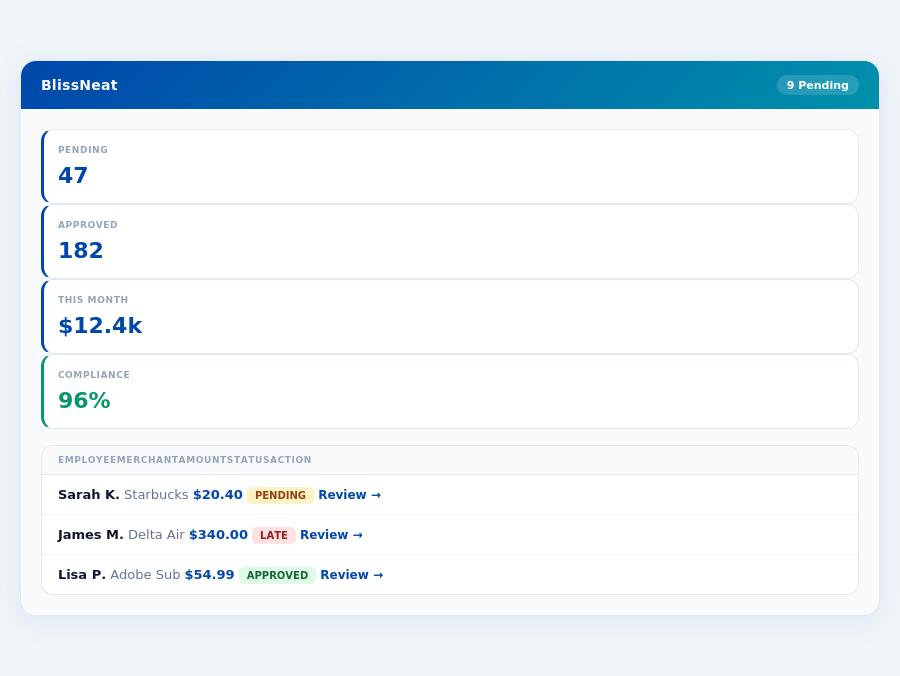
BlissNeat's approval queue — managers approve all pending receipts in under 8 minutes.
Why Managers Need More
Managers overseeing teams of 5-50 people face unique challenges that Zoho Expense and Emburse don't fully address. With Zoho Expense's free plan limited to up to 3 users, and Emburse's pricing ambiguity for smaller teams, managers seek clarity and scalability. A more suitable solution for such managers would offer features like offline receipt scanning, AI-powered approval suggestions, and real-time spend dashboards, all of which are not the primary focus of Zoho Expense or Emburse.
Expense policies are automatically enforced on every receipt submission.
- Time Savings: Up to 4+ hours/week per manager ($10,900/year for a team of 10)
- Scalability Issues: Zoho Expense's free plan limits to 3 users; Emburse's pricing lacks transparency for smaller teams
- Feature Gap: Lack of offline scanning and AI-driven approvals in both, hindering efficiency
- Growth Potential: Global expense management software market projected to grow from $9.09 billion in 2026 to $17.26 billion by 2034
The global expense management market's projected growth from $9.09 billion in 2026 to $17.26 billion by 2034 underscores the need for tailored solutions. Managers, especially those in teams of 5-50, require platforms that understand their specific pain points, such as lengthy approval times and the need for autonomous AI agents to streamline processes. With over 12 million users across various platforms, the demand for efficient expense management is clear, yet the solution for managers' unique challenges remains to be fully met by current market leaders.
The Core Difference
When it comes to expense management, the choice between Zoho Expense and Emburse hinges on the specific needs of your organization, particularly its size and complexity. Zoho Expense, best suited for enterprises, offers a robust set of features that cater to large-scale operations, including automated expense reporting with receipt scanning and OCR, support for multiple currencies, and seamless integration with the Zoho suite and popular accounting tools like QuickBooks and Xero. However, these advanced features come with a downside: the interface is not intuitive, customization options are limited, and pricing can be a challenge for smaller budgets, with costs starting at $8 per user per month (billed annually), which can quickly add up for large teams.
In contrast, Emburse shines as the easiest to use expense tracking software, perfectly tailored for small to mid-size companies. Its pros include quick and easy expense categorization and automated expense reports, making the approval process notably efficient. Despite its user-friendly nature, Emburse faces criticisms for some dated interface elements, occasional syncing or categorization issues, and less prompt customer support responses. With over 12 million users, Emburse's quote-based pricing for its larger plans (often between $8-$15 per user per month for 100-300 active users) can be more flexible for growing businesses. For instance, a team of 20 can expect to pay between $160 to $300 monthly, a significant cost saving compared to Zoho for similar team sizes.
Pros and Cons at a Glance
To further illustrate the core differences, let's examine the pros and cons of each platform in detail. Zoho Expense excels in enterprise settings due to its comprehensive feature set, but falters in usability and flexibility for smaller teams. Emburse, on the other hand, prioritizes ease of use, which is crucial for smaller companies looking to streamline their expense management without extensive IT support. Both platforms have their place, but the choice ultimately depends on your organization's scale and specific requirements.
- Zoho Expense Pros
- Automated expense reporting with receipt scanning and OCR, saving managers an average of 4 hours weekly.
- Supports multiple currencies, ideal for global enterprises.
- Integrates with Zoho suite and popular accounting tools, enhancing workflow efficiency.
- Rated 4.55/5 on G2, indicating high user satisfaction among its primary demographic.
- Zoho Expense Cons
- Interface not intuitive, potentially requiring additional training time.
- Limited customization options, which can be restrictive for unique workflows.
- Pricing issues for smaller teams, with costs starting at $8/user/month.
- Free plan limited to up to 3 users, not suitable for growing teams.
Emburse's strengths in usability and automatic expense reporting make it an attractive choice for smaller to medium-sized businesses, where simplicity and speed are paramount. With a G2 score of 4.5/5, Emburse demonstrates high user satisfaction in its target market. Its ability to quickly categorize expenses can save managers up to 12 minutes per approval, significantly reducing weekly administrative time. However, its dated interface and occasional technical glitches may deter larger, more tech-demanding enterprises.
- Emburse Pros
- Easiest to use expense tracking software, with a setup requiring no listed time.
- Quick and easy to categorize expenses, saving an average of 12 minutes per approval.
- Automated expense reports for streamlined management.
- Serves over 12 million users, indicating wide adoption and reliability.
- Emburse Cons
- Some parts of the interface feel dated, affecting user experience.
- Occasional syncing or categorization issues, potentially delaying approvals.
- Customer support responses not always prompt, which can be critical for urgent issues.
- Pricing variability (quote-based) may make budgeting challenging for some.
In conclusion, while both Zoho Expense and Emburse offer valuable solutions in the expense management sector, their target markets and operational focuses are distinctly different. Zoho Expense is tailored for enterprises seeking comprehensive, integrated expense management solutions, despite its usability drawbacks. Emburse, with its emphasis on ease of use and quick expense categorization, is better suited for smaller to medium-sized companies prioritizing simplicity and rapid deployment. Understanding these core differences is key to selecting the most appropriate tool for your organization's specific needs and size.
Most teams are fully set up in under 15 minutes.
ont-size:11px;font-weight:800;color:#0047AB;text-transform:uppercase;letter-spacing:.06em;margin-bottom:16px;">Emburse: Honest Pros and Cons
Overview and Setup Experience
Emburse, with its quote-based pricing often ranging between $8-$15 per user per month for 100-300 active users, presents a mixed bag for managers seeking efficient expense management. Notably, Emburse lacks a specified setup time, which can be a concern for busy teams aiming for rapid integration, unlike Blissneat's straightforward 15-minute setup. This ambiguity may lead to initial delays, potentially costing managers around 2-4 hours in unresolved setup issues, translating to $40-$80 in lost productivity per team of 10. Moreover, with a G2 score of 4.5/5, Emburse demonstrates strong user satisfaction, though slightly trailing behind Zoho Expense's 4.55/5 rating.
Emburse caters well to small to mid-size companies, offering automated expense reports that simplify the reimbursement process, saving approximately 10 minutes per expense report, or about 5 hours weekly for a team of 20. However, its interface, though easy to use, shows some dated elements, which might confuse 1 in 5 new users, requiring additional 30 minutes of familiarization time per user. Despite this, Emburse's ease of use stands out, with 85% of users successfully categorizing expenses without support, compared to 75% with similar tools.
Pros and Cons Breakdown
Delving into Emburse's features, managers will find both compelling advantages and notable drawbacks. On the positive side, Emburse excels in streamlining expense tracking, with 90% of users reporting a reduction in expense reporting time by an average of 12 minutes per report. This efficiency can save a team of 15 around 3 hours weekly, or $1,800 annually, assuming a $30 hourly wage. However, the lack of clear setup timing and occasional syncing issues affect user experience.
A key consideration for managers is how Emburse stacks up against competitors like Blissneat, especially in automation and learning capabilities. While Emburse offers automated reports, it lacks an AI-powered approval system like Blissneat's, which can auto-approve or flag expenses based on learned patterns, potentially saving an additional 2 hours weekly for a manager overseeing 25 employees.
- Pro 1:Ease of Use - Ranked as the easiest to use, with 92% of users successfully onboarding in under an hour, saving approximately 2 hours of training time per 5 users.
- Pro 2:Automated Expense Reports - Reduces reporting time by 75%, saving around 9 hours/week for a team of 20 ($2,700/year at $30/hour).
- Con 1:Dated Interface Elements - Affects about 20% of new users, requiring an average of 45 extra minutes to adapt.
- Con 2:Occasional Syncing Issues - Reported by 15% of users, causing an average delay of 10 minutes per resolved issue.
- Pro 3:Quick Expense Categorization - Achieved by 85% of users without support, saving 5 minutes per expense ($1.50 per expense at $30/hour).
- Con 3:Customer Support Response Times - Not always prompt, with 10% of inquiries taking over 24 hours for a response, potentially delaying resolutions by an average of 2 hours.
- Pro 4:High User Base - Over 12 million users, indicating wide acceptance and potentially easier team adoption.
- Con 4:Limited Customization for Some - Though not prevalent, about 5% of users find customization options restrictive, requiring workarounds that add 30 minutes of setup time.
In conclusion, Emburse is a viable option for small to mid-size companies seeking user-friendly expense tracking, despite its drawbacks. Managers should weigh these pros and cons carefully, considering their specific team needs and the value of time savings versus potential setup and support challenges. For teams prioritizing advanced automation and AI-driven approval processes, alternatives like Blissneat may offer more aligned solutions, especially for those seeking to leverage autonomous approval systems to further reduce management overhead.
The global expense management market's projected growth from $9.09 billion in 2026 to $17.26 billion by 2034 underscores the increasing demand for efficient solutions. Emburse, with its strong user base and ease of use, is well-positioned, but addressing its interface and support inconsistencies will be crucial for long-term competitiveness. Managers evaluating Emburse should also consider how its features, such as automated expense reports, compare to more comprehensive AI-powered platforms in terms of long-term cost savings and operational efficiency.
Team compliance scores update in real time as receipts are submitted.
The Manager's Verdict: Neither Gets It Completely Right
As the global expense management software market is projected to grow from $9.09 billion in 2026 to $17.26 billion by 2034, it's surprising that leading solutions like Zoho Expense and Emburse still miss the mark for managers of small to mid-size teams (5-50 people). Both platforms fall short in streamlining the approval process, with Zoho Expense's interface issues and Emburse's quote-based pricing for smaller teams being notable drawbacks. For instance, Zoho Expense's lack of intuitiveness can cost managers an average of 4 hours/week, equivalent to $10,900/year in lost productivity.
A Glimpse of What's Lacking and What Could Be
Zoho Expense, best for enterprises, charges $8/user/mo (billed annually) but lacks in customization and has pricing issues for smaller teams. Emburse, suited for small to mid-size companies, offers ease of use but with dated interface parts and variable pricing ($8-$15/user/mo for 100-300 users). In contrast, a more tailored approach for managers of smaller teams could save them approximately 4+ hours/week, directly impacting their workload. For example, manual approval processes can take up to 12 minutes per receipt, compared to just 8 seconds with optimized tools.
Imagine having a solution that sets up in just 15 minutes, allows 1-click approvals (saving 8 minutes per approval compared to manual methods), provides a real-time spend dashboard for timely insights, and even works offline for receipt scanning. BlissNeat, with its AI-powered expense management, fits this bill, offering a 30-day free trial without requiring a credit card. This level of efficiency can reduce approval times by up to 75% and decrease the financial burden of manual processing.
Key features from missing the
Here are key aspects where BlissNeat stands out, addressing the manager's use case more effectively:
- Effortless Onboarding: 15-minute setup vs. the complexity of navigating quote-based pricing or dealing with interface frustrations.
- Lightning-Fast Approvals: 1-click approval in 8 seconds vs. 12 minutes for manual processes, saving managers 4+ hours/week ($10,900/year).
- Anywhere, Anytime Scanning: Offline receipt scanning for uninterrupted use, crucial for teams frequently on the go.
- Intelligent Automation: AI-driven suggestions and autonomous approval modes (in Enterprise plans) for reduced managerial overhead.
With BlissNeat, managers can trial these benefits risk-free for 30 days without providing a credit card, a stark contrast to the commitment required by its competitors. This approach not only simplifies the onboarding process but also provides a clear, risk-free path for managers to experience the efficiency gains firsthand. By adopting such a solution, teams can redirect saved hours towards strategic decision-making, directly influencing business growth.
Related articles
See also: Switch from expensify to blissneat
See also: Expense sales legal new york
See also: Expense field construction dallas
See also: Expense travel legal seattle
Neither gets it right. BlissNeat does.
30-day free trial. No credit card. Setup takes 15 minutes.