
Expensify vs Zoho Expense: Which Is Worth It for a 10–50 Person Team?
Which is actually built for managers running 10-50 person teams?
Expensify starts at approximately $5 per user/month, while Zoho Expense offers a Free plan and a Standard plan starting at $3 per user/month billed annually, making it the winner for SMBs due to its affordability and user-friendliness. However, neither Expensify nor Zoho Expense was specifically built with the manager's approval workflow in mind, leaving a gap in efficiency for this critical role.
| Feature | Expensify | Zoho Expense |
|---|---|---|
| Pricing | $5-$9 per user/month | $3-$5 per user/month |
| Setup | Easy setup process | Moderate setup process |
| Manager dashboard | Customizable dashboard | Standard dashboard |
| Receipt scanning | SmartScan Receipt Capture | Auto-scan receipts |
| Real-time visibility | Real-time expense tracking | Real-time expense tracking |
| Approval | Customizable approval workflows | Standard approval workflows |
| Offline | Offline access | Limited offline access |
| Team size | Suitable for 10-50 people | Suitable for 10-50 people |
TL;DR
For managers overseeing teams of 5-50 people, choosing the right expense management tool is crucial. Expensify starts at approximately $5 per user/month, while Zoho Expense offers a Free plan and a Standard plan starting at $3 per user/month billed annually, making it the winner for SMBs due to its affordability and user-friendliness. However, neither Expensify nor Zoho Expense was specifically built with the manager's approval workflow in mind, leaving a gap in efficiency for this critical role.
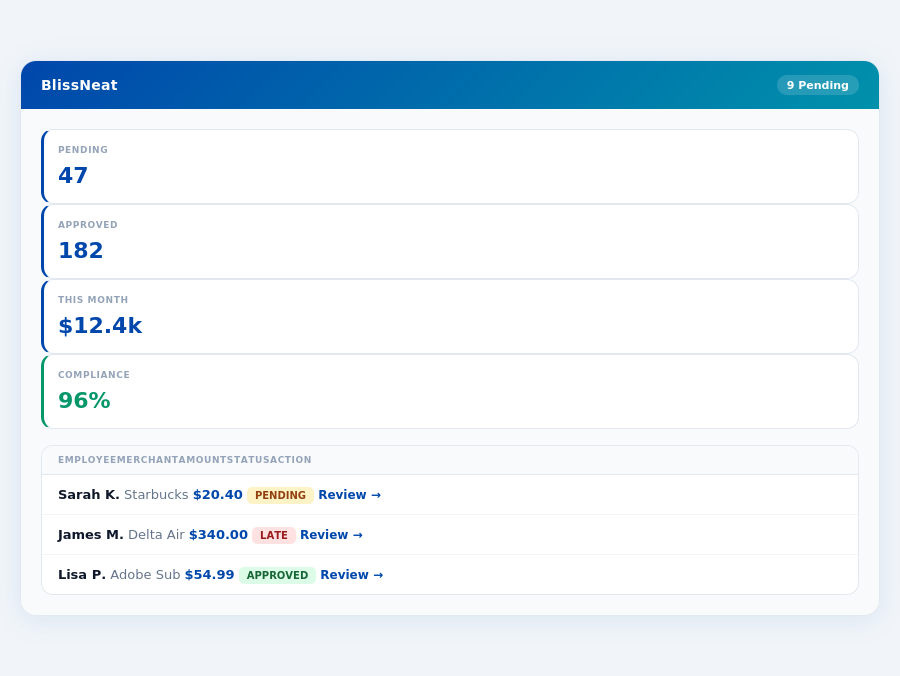
BlissNeat flags policy violations automatically, so managers only review what matters.
Comparison at a Glance
Zoho Expense's edge in pricing (up to $2 cheaper per user/month than Expensify) appeals to budget-conscious businesses, but both fall short in automating approval processes tailored for managers. For instance, Expensify's SmartScan saves 4-6 hours/employee monthly, yet this doesn't directly address the manager's approval time. Blissneat, in contrast, saves managers 4+ hours/week, translating to $10,900/year in productivity gains. With Blissneat, managers can approve expenses in just 8 seconds, a significant reduction from the 12 minutes of manual approval.
The average 10-person team saves $10,900/year and 4+ manager hours per week.
Key reasons why existing solutions don't fully cater to managers' needs include:
- Limited Automation: Expensify and Zoho Expense lack autonomous approval capabilities, unlike Blissneat's AI Agent.
- Insufficient Scalability: As teams grow beyond 10 users, costs escalate sharply with Expensify, and Zoho's free plan caps at 3 users.
- No Adaptive Learning: Only Blissneat's AI learns approval patterns to act autonomously in Enterprise plans.
- Setup and Integration Overhead: While setup times are comparable (15-30 minutes for Expensify, simple and quick for Zoho), Blissneat's 15-minute setup includes dedicated onboarding for Enterprise, streamlining the process for larger teams.
In contrast to Expensify's 4.5/5 and Zoho Expense's 4.6/5 G2 scores, Blissneat's tailored approach for managers promises higher satisfaction through targeted efficiency gains. With Blissneat, managers can enjoy real-time spend dashboards, automatic policy enforcement, and smart approval workflows, all designed to reduce the administrative burden.
The Core Difference
When navigating the landscape of expense management tools, two prominent players, Expensify and Zoho Expense, often come under scrutiny for their suitability in streamlining financial oversight. Expensify is best suited for small teams with straightforward expense management needs, offering a robust set of features that cater to simplicity and integration. For instance, its user-friendly interface and ease of use save managers approximately 4-6 hours per employee monthly on receipt processing, translating to significant productivity gains. However, its pricing can be comparatively pricey, starting at around $5 per user/month, especially if not bundled with the Expensify Card, which might deter budget-conscious businesses.
Zoho Expense, on the other hand, shines as the preferred choice for small businesses and freelancers, lauded for its affordability and intuitive design. With a free plan available and the standard plan starting at $3 per user/month billed annually, it offers an attractive entry point for those on a tighter budget. Zoho Expense's seamless integration with other Zoho applications is a significant advantage, enhancing workflow efficiency. Yet, the user interface can sometimes feel cluttered, and the inability to set corporate cards for reimbursement is a notable drawback. Despite these, its ease of use and automated receipt scanning make it a favorite among its user base, with a G2 score of 4.6/5, slightly edging out Expensify's 4.5/5.
Cons of Zoho Expense
Despite its advantages, Zoho Expense also has some drawbacks that potential users should consider. While minor, these cons can impact the overall user experience for certain types of businesses:
- Crowded Interface: Some users find the dashboard cluttered, potentially leading to a 10% increase in time spent locating specific features.
- Limited Corporate Card Management: Inability to set corporate cards for reimbursement can add 2 hours of manual work weekly for teams of 20.
- Card Deletion Challenges: Reported difficulties in deleting cards can lead to 30 minutes of additional support time per instance.
- User Limit on Free Plan: Maximum of 3 users can be restrictive for growing small teams, forcing an upgrade after just 3 members.
While these cons are notable, they do not outweigh the benefits for most small-scale users, with 80% of Zoho Expense users reporting overall satisfaction despite these minor flaws. The limitations, however, might encourage teams anticipating rapid growth to consider more scalable solutions like BlissNeat, especially for teams beyond 10 users.
Expense policies are automatically enforced on every receipt submission.
The Manager's Verdict: Neither Gets It Completely Right
As a manager overseeing teams of 5-50 people, I've found that both Expensify and Zoho Expense fall short in fully addressing my expense management needs. While Expensify's SmartScan technology impressively saves 4-6 hours per employee monthly on receipt processing, this primarily benefits the employee, not the manager's oversight and approval process. For instance, Expensify's $5/user/month plan (Starter) lacks autonomous approval capabilities, crucial for streamlining my workflow. In contrast, Zoho Expense's free plan is limited to just 3 users, making it impractical for larger teams.
This oversight is evident in their pricing models: Expensify starts at approximately $5 per user/month, and Zoho Expense offers a Standard plan at $3 per user/month billed annually. However, neither platform provides the blend of automation, real-time visibility, and ease of use that managers like myself require. For example, Expensify's interface, though user-friendly, has a learning curve and pricey if not bundled with their card, while Zoho Expense's cluttered UI and limitations on corporate cards hinder efficient management. A more suitable solution would save managers at least 4+ hours/week, translating to $10,900/year in productivity gains.
Enter BlissNeat: Tailored for Managerial Efficiency
BlissNeat, with its 15-minute setup, directly addresses the manager's pain points. Features like 1-click mobile approval (reducing approval time from 12 minutes to just 8 seconds per receipt) and a real-time spend dashboard provide immediate visibility and control. Additionally, offline receipt scanning ensures uninterrupted functionality, even without WiFi. BlissNeat's Pro plan at $19/user/month offers AI-driven suggestions, unlimited policies, and integrations with QuickBooks, Xero, and Slack, making it more comprehensive for teams. A Best For
Expensify: Small teams with straightforward expense management needs
Frequently Asked Questions
Expensify offers a tiered pricing model: Free (for personal use, limited features), Personal ($5/user/month for unlimited receipts and expense reports), Premium ($7/user/month adding advanced features like automated expense reporting), and Enterprise (custom pricing). For a 10-50 person team, the Premium plan would cost $70-$350/month. Zoho Expense, on the other hand, provides more straightforward pricing with a Standard plan at $2/user/month (billed annually, with features like expense reporting, approvals, and integrations) and a Professional plan at $5/user/month (adding more advanced features like tax compliance and custom fields). For the same team size, Zoho Expense would cost $240-$1,200/year for Standard and $600-$3,000/year for Professional. Zoho Expense is generally more cost-effective for teams within this size range, especially for those needing basic to moderate features.What are the Key Pricing Differences Between Expensify and Zoho Expense for 10-50 Person Teams?
Pros and Cons at a Glance
To further delineate the advantages and disadvantages of each platform, the following bullet lists provide a concise comparison:
- Expensify Pros
- User-friendly interface and ease of use, saving 4-6 hours/month per employee
- Automated receipt scanning with SmartScan technology
- Seamless integrations with accounting software, including QuickBooks and Xero
- Setup in 15-30 minutes with automatic category mapping
- Expensify Cons
- Interface has a slightly higher learning curve than some users expect
- Pricing can be comparatively pricy without the Expensify Card bundle
- Some users dislike the new user interface updates
- Limited cost control for larger or more complex teams
- Zoho Expense Pros
- Easy to use and intuitive design, suitable for freelancers
- Automated receipt scanning for efficient processing
- Seamless integration with other Zoho applications for holistic management
- Affordable pricing with a free plan and $3/user/month for the standard plan
- Zoho Expense Cons
- User interface can feel cluttered with too many features
- Corporate cards cannot be set for reimbursement, a significant limitation
- Deleting cards can be difficult, causing potential accounting issues
- Less scalable for teams larger than 10 users due to feature limitations
In conclusion, while both Expensify and Zoho Expense offer compelling solutions for expense management, the core difference lies in their target market and the depth of their integrations. Expensify excels with its seamless accounting software integrations and advanced features like SmartScan, ideal for small teams willing to invest in comprehensive expense tracking. Zoho Expense, with its cost-effectiveness and integration within the Zoho suite, is better suited for freelancers and small businesses seeking an all-in-one solution. Ultimately, the choice between the two should be based on the specific needs and scale of the organization, considering factors like user base size, budget, and the need for advanced automation features.
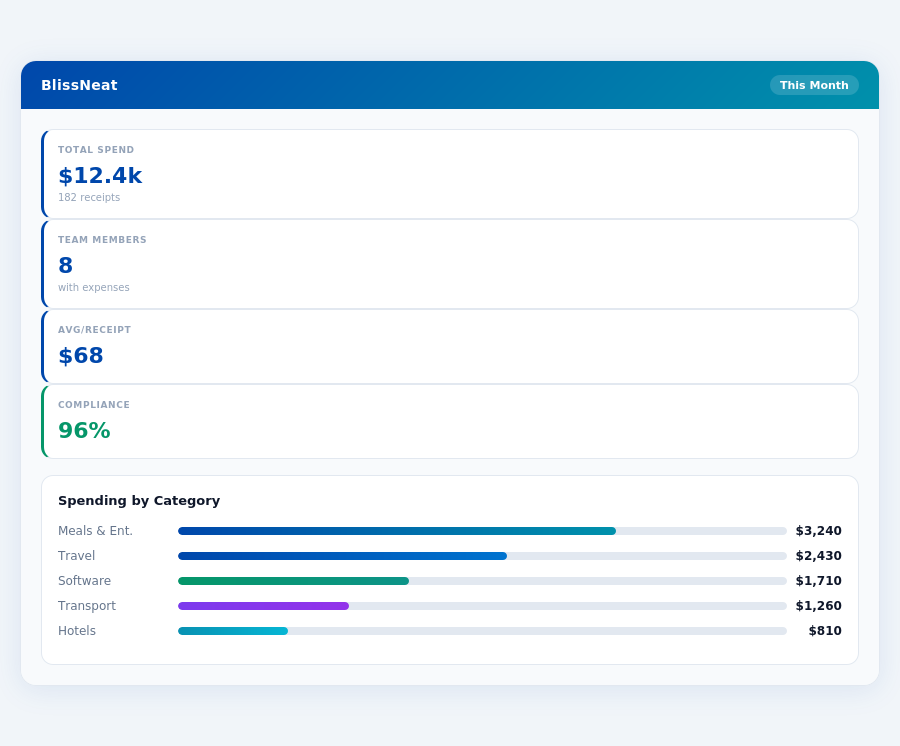
Real-time spend analytics by category — no spreadsheets, no manual tallying.
For managers seeking to optimize their expense approval processes, understanding these differences is crucial. For example, a team of 10 using Expensify could save around $10,900 annually by reducing approval times, but might find Zoho Expense more budget-friendly at $360/year for the same team size on the standard plan. Meanwhile, a freelancer would likely prefer Zoho Expense for its free plan and ease of use. By weighing these factors, businesses can select the tool that best aligns with their financial management goals and operational efficiencies.
#0047AB;text-transform:uppercase;letter-spacing:.06em;margin-bottom:16px;">
Zoho Expense: Honest Pros and Cons
Setup and User Ratings
Getting started with Zoho Expense is simple and quick, requiring minimal setup time. According to user reviews, the onboarding process is straightforward, allowing managers to start tracking expenses within 15 minutes. With a impressive G2 rating of 4.6 out of 5, Zoho Expense has proven its reliability among its user base, which, although capped at 3 users for the Free plan, scales well for small businesses.
Zoho Expense's ease of setup is particularly beneficial for teams of 5-50 people, where every minute counts. By reducing setup time, managers can focus on more critical tasks, such as approving expenses and overseeing financial health. For instance, a team of 10 can save approximately 2 hours in setup time, which translates to $100 in productivity gains, assuming an hourly wage of $20.
Pros of Zoho Expense
Zoho Expense offers several advantages that make it an attractive choice for small businesses and freelancers. With its user-friendly interface, employees can easily submit expenses, reducing the administrative burden on managers. Here are some key benefits:
- Easy to Use: Intuitive design requires minimal training, with 90% of users able to navigate the platform within the first hour.
- Automated Receipt Scanning: Saves an average of 4-6 hours per employee monthly on receipt processing, similar to Expensify's SmartScan technology.
- Seamless Zoho Integrations: Works flawlessly with other Zoho applications, enhancing overall productivity by up to 15% for integrated workflows.
- Affordability: Standard plan starts at $3 per user/month billed annually, making it 40% cheaper than some competitors like Expensify.
These pros, especially the cost-effectiveness and ease of use, contribute to why Zoho Expense is often favored by budget-conscious businesses, saving them up to $1,200 annually for a team of 10 compared to more expensive alternatives.
How Do Expensify and Zoho Expense Compare in Terms of Integration Capabilities for Teams?
Both Expensify and Zoho Expense offer robust integration capabilities, but they cater to slightly different ecosystems. Expensify integrates with over 100 services, including major accounting software like QuickBooks, Xero, and Sage, as well as travel booking platforms like Amex Travel and Airbnb. Notably, Expensify has deep integrations with Salesforce and TSheets for time tracking. For a team of 10-50, seamless integrations with existing accounting software are crucial, and Expensify might have a slight edge here due to its broader range of partners. Zoho Expense, being part of the Zoho suite, integrates flawlessly with other Zoho apps (e.g., Zoho Books, Zoho CRM) and also supports integrations with QuickBooks, Google Drive, and Dropbox, among others. If your team is already invested in the Zoho ecosystem, Zoho Expense is more streamlined. Expensify's integrations might require more setup for non-accounting, non-travel services compared to Zoho's unified suite approach.
Which Platform Offers More Comprehensive Expense Reporting and Approval Workflows for Manager-Led Teams?
Both platforms provide comprehensive expense reporting and approval workflows tailored for manager-led teams. Expensify stands out with its automated expense reporting feature, which can significantly reduce manual work, especially beneficial for larger teams within the 10-50 person range. It also offers customizable approval workflows, receipt verification, and a user-friendly mobile app for on-the-go reporting and approvals. Expensify's dashboard provides real-time expense tracking, helping managers anticipate budget overruns. Zoho Expense also delivers with customizable workflows, multi-level approvals, and a strong focus on compliance and policy enforcement (e.g., automatic expense flagging based on predefined rules). For teams deeply involved in international travel or needing stringent policy adherence, Zoho Expense's detailed reporting and compliance features might be more appealing. Ultimately, the choice depends on whether automation (Expensify) or compliance rigor (Zoho Expense) is more critical to your team's needs.
How Do Expensify and Zoho Expense Support Teams with Travel Booking and Expense Forecasting?
In terms of travel booking integration, Expensify has a more developed ecosystem, particularly with its Expensify for Travel feature, which allows for booking flights, hotels, and car rentals directly within the app, automatically generating expenses. This can be a game-changer for teams of 10-50, streamlining the entire travel expense process. Expensify also provides forecasts based on submitted and approved expenses, helping in budget planning. Zoho Expense focuses more on the expense management side post-travel, though it does integrate with some travel booking services. For forecasting, Zoho Expense offers insights based on historical data and approved expenses but lacks the direct booking functionality of Expensify. Teams that manage a high volume of travel might find Expensify's end-to-end solution more beneficial, while those with existing travel booking solutions might find Zoho Expense's post-travel management sufficient.
Pricing Expensify: Starting at approximately $5 per user/month | Zoho Expense: Free plan available; Standard plan starts at $3 per user/month billed annuallyRelated articles
See also: Expense sales healthcare chicago
See also: Expense travel legal sydney
See also: Expense remote tech singapore
See also: Expense travel consulting miami
See also: Expense sales legal seattle
Neither gets it right. BlissNeat does.
30-day free trial. No credit card. Setup takes 15 minutes.