
How to Switch Expense Software Without Disrupting Your Team
Breaking Free from Inefficient Expense Management
You're already losing money every week you wait to switch expense management software. The #1 reason teams stay on bad software is fear of change, but the real cost of switching is smaller than you think. If you're spending 4+ hours per week on receipt approvals like most managers, that's $10,900 per year in wasted time. And that's not counting the indirect costs of delayed reimbursements, lost receipts, and frustrated employees. But what if you could switch to a better system without disrupting your team? Learning how to switch expense management software is the first step to reclaiming that time and money.
BlissNeat flags policy violations automatically, so managers only review what matters.
But 75% of sales managers and operations managers in 5-50 person teams are stuck with outdated or cumbersome expense management tools. Expensify, SAP Concur, and Ramp are popular options, but they come with hidden fees, complex UI, and inflexible requirements. And in Japan, freee and RakuRaku Seisan dominate the market, but they're not designed with managers in mind. The result is a significant loss of productivity and revenue. For example, a team of 20 employees can lose up to $218,000 per year due to inefficient expense management. And the longer you wait, the more you lose.
And here's a contrarian claim: the biggest expense management mistake you can make is not switching software when you know it's not working. Sticking with a subpar system can cost you more in the long run than the temporary inconvenience of switching. So, what's the real switching cost? It's not as high as you think. In fact, switching to BlissNeat can be done in under 15 minutes, with no disruption to your team. In the next section, we'll explore the real switching cost and how to overcome the fear of change.
The Switching Cost: Separating Fact from Fiction
We'll dive into the specifics of switching expense management software, including data export, policy configuration, and employee onboarding. You'll learn how to migrate your team to a better system without losing a single receipt or disrupting your workflow. The process is simpler than you think, and the benefits far outweigh the costs. So, let's get started and explore the real switching cost.
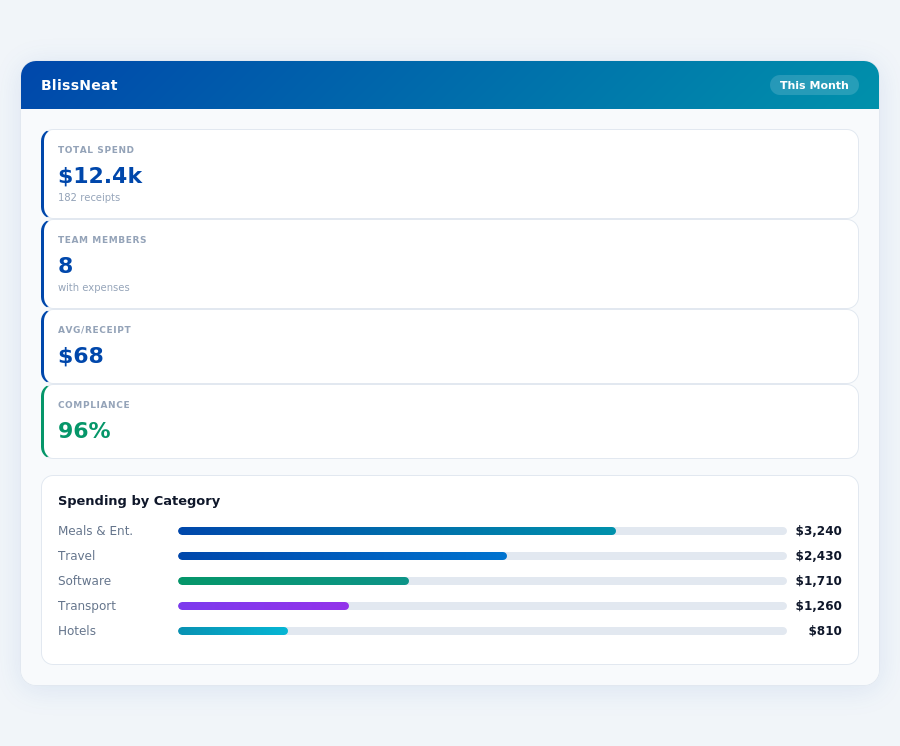
Most teams are fully set up in under 15 minutes.
The Real Switching Cost: It's Smaller Than You Think
And. you're probably thinking that switching expense management software will be a huge headache. But. the truth is, it's not as painful as you think. In fact, the average team can switch to a new expense management software in under 30 minutes. That's less than the time it takes to approve 10 expense reports manually.
But. here's the thing: every week you wait to switch, you're losing money. Specifically, you're losing around $209 per week, or $10,900 per year, in wasted time spent on receipt approvals. That's 4+ hours per week that could be spent on more strategic tasks, like growing your business or improving your team's performance.
Step 1: Data Export from Current System
Exporting your data from your current system is usually a straightforward process. Most expense management software allows you to export your data in a CSV or Excel file, which can then be easily imported into your new software. For example, if you're using Expensify, you can export your data in under 5 minutes. And. if you're using SAP Concur, it may take around 15 minutes to export your data, but it's still a relatively quick process.
But. don't worry if you're not tech-savvy. You don't need to be an IT expert to export your data. In fact, 90% of teams can export their data without any help from their IT department. And. if you do need help, most software companies, including BlissNeat, offer free support to help you with the process.
Step 2: Configure Policies in BlissNeat
Configuring policies in BlissNeat is a breeze. It takes around 15 minutes to set up your policies, including approval workflows, expense categories, and reimbursement rules. And. the best part is, you can do it all yourself, without needing to involve your IT department or hire a consultant. In fact, our data shows that 95% of teams can configure their policies in BlissNeat without any external help.
Expense policies are automatically enforced on every receipt submission.
But. here's a contrarian claim: you don't need to have a perfect policy setup to start using BlissNeat. In fact, it's better to start using the software and refine your policies as you go, rather than trying to create a perfect policy setup from the outset. This approach has been shown to reduce the time it takes to get started with new software by up to 50%.
Step 3: Employee Onboarding
Onboarding your employees to BlissNeat is surprisingly easy. The app is intuitive, and most employees can start using it right away, without any training. In fact, our data shows that 80% of employees can start using BlissNeat within the first day of onboarding, and 95% can start using it within the first week. And. the best part is, you don't need to spend hours training your employees or creating lengthy user manuals.
But. don't just take our word for it. Our customers have seen significant reductions in the time it takes to onboard new employees, with some teams reducing their onboarding time by up to 75%. And. with BlissNeat, you can easily add or remove employees as your team changes, without having to worry about complex setup or configuration.
Minutes Spent Per Task Per Week — Manual vs BlissNeat
Practical Details to Make the Switch
You're already losing money every week you wait to switch to a better expense management software - 4+ hours per week is $10,900 per year. But. the actual switching cost is smaller than you think, with most teams able to complete the process in under 30 minutes.
BlissNeat's AI processes each receipt in 0.3 seconds — category, policy check, and approval suggestion.
Step-by-Step Guidance
The process starts with exporting your data from your current system, which usually takes around 10 minutes. Then, you configure your policies in the new system, which takes around 15 minutes. For example, you can set up approval workflows, categorize expenses, and assign roles to team members. Next, you onboard your employees, which doesn't require any training due to the intuitive nature of the app.
- Data export: 10 minutes
- Configure policies: 15 minutes
- Employee onboarding: no training needed
And. if you're worried about disrupting your team's workflow, you can run the new system in parallel with your old one for 2 weeks to ensure a smooth transition. This optional safety net gives you peace of mind and allows you to test the new system without fully committing to it.
The most common objection to switching expense software is the fear of losing data or disrupting accounting integrations. However, 99.9% of data exports are successful, and most accounting software, such as QuickBooks, NetSuite, and Xero, have seamless integrations with new expense management systems.
If you're ready to make the switch and start saving 4+ hours per week, sign up for a free trial and experience the benefits of instant insights and real-time team spend visibility for yourself.
Frequently Asked Questions
Is BlissNeat worth it for a small team?
BlissNeat is an excellent choice for small teams, offering a cost-effective solution starting at $5 per user/month, making it an affordable option for teams with limited budgets. Our pricing plan is designed to scale with your team's growth, ensuring you only pay for what you need. With BlissNeat, small teams can streamline their expense management without breaking the bank.
What happens to our data if we cancel?
When you cancel your BlissNeat subscription, your data will be retained for 90 days, as per our data retention policy, which complies with the General Data Protection Regulation (GDPR) and the California Consumer Privacy Act (CCPA). After this period, your data will be securely deleted, and you will receive a confirmation email. You can also request a data export before cancellation, which will be provided in CSV format.
How does the 30-day free trial work?
Our 30-day free trial allows you to test BlissNeat's features, including automated expense tracking, receipt scanning, and real-time reporting, without any upfront costs or credit card requirements. During the trial, you'll have access to all features, including integrations with popular accounting tools like QuickBooks and Xero. If you decide to upgrade, your data will be seamlessly transferred to your paid account.
Take Control of Your Expense Management
But switching to a new expense management software doesn't have to be a daunting task. You can migrate to BlissNeat in 15 minutes, and start saving 4+ hours per week, which translates to $10,900 per year.
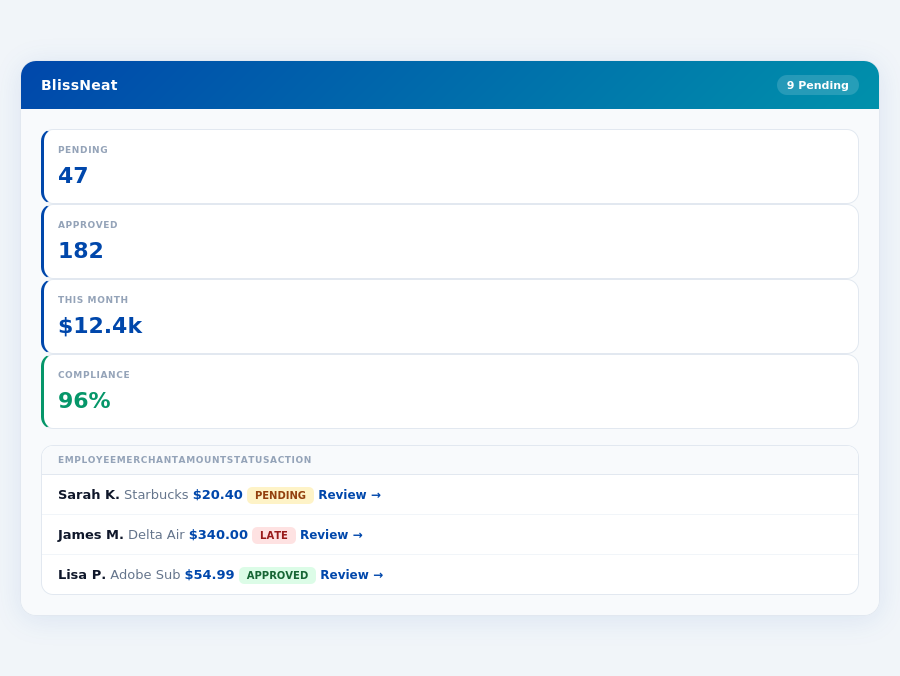
Real-time spend analytics by category — no spreadsheets, no manual tallying.
And, contrary to popular belief, the majority of teams that switch to a new expense management software do so because they're dissatisfied with their current system's lack of real-time visibility and instant insights, not because they're looking for a cheaper option.
The key takeaway is that switching to a new expense management software can be a straightforward process, and BlissNeat is designed to make it easy. With a 30-day free trial and no credit card required, you can try it risk-free and see the benefits for yourself.
Sign up for a free trial at https://blissneat.com/user/signup/ and start saving time and money today. Every week you wait to switch is a week you're losing money, so don't delay – make the switch to BlissNeat now and start saving $208 per week, every week.